Friday, September 25, 2009

Free tool for item level restore

Hello

who of as that dont kwon, Docave is a company that develop a variety of sharepoint product like excellent backup system & content migration product and even anti virus for sharepont .
now thay release a nice free tool, that can help you to restore a single item in your farm.
The “FREE Tool for Item-level SharePoint Restores” can connect to your traditional backup method , like SQL backup (BAK files) and DPM and restore a single item with is metadata : data, author, etc…).

So give it a try

Thanks Yaniv

Monday, September 14, 2009

Explorer view is very slow

When opening explorer view in farm with two or more Web Fornd end server behind NLB,
you can wait same good time until the library is open , the reason for this behavior is :
By default, Windows Server 2003 does not respond to SMB queries that use a server name other than the server’s true NetBIOS name or FQDN. If this is attempted, the server will respond with a STATUS_DUPLICATE_NAME error.

To fix this you need to add regestry key in both Frontend Server and then restart them .

this KB KB281308 have more detiles on this issue.

Same good article abot smb Webdev and explorer view
Whitepaper - Understanding and Troubleshooting the SharePoint Explorer View
Thanks Yaniv Shasha

Friday, July 31, 2009

VMWare VSPhere VS. Hyper-V R2

Hi all


In the last few months', I'm dealing (except sharepoint of course ) in the virtualization world, mostly in the VMware side.

so I want to share with you, same nice series of posts that comporting the two major player in this market
VSphare –( ESX4 ) the new version of VMware products
Hyper-v – the first hypervisor based Microsoft product

this is a three round battle
enjoy
Yaniv shasha

Monday, June 8, 2009

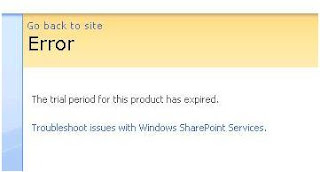
the trial period for this product has expired

Hello
I want to share with you same issue that i had in customer farm,
every time that the Farm admin try to access the profile section in the SSP, or the end users tried to enter their My site or tried search something, They get a wired error "the trial period for this product has expired"

So like a educated boy i changed the CDKEY- but still this irritating error.
The next step is "Google diggings" I found same post that said to changed the DCOM security, its work only for 2 hours .

long story short, the one to blame in this never ending story is the MacAfee antivirus (with SharePoint agent)
it scanning and taking control on the CAL mechanism, and its consequence gave the license error.

Here is what Microsoft said about this issue

Thanks yaniv

Friday, May 15, 2009

Troubleshoot content deployment

The content deployment feature in MOSS 2007 can be very tricky and sometime you need to be very patient to make it work.
Microsoft publish great
article that can help as troubleshoot the process.
Another good source to look for solution is
Stefan Goßner blog

I hope you find it helpful

Thanks yaniv shasha

Thursday, April 30, 2009

Moss advanced Search with "CreatedBy" and "ModifiedBy" Properties no result Found


Hello
I want to share a littile experience with MOSS advanced Searrch
When we query the search agent throw advanced Search page "Pages/Advanced.aspx"
with filter properties of "CreatedBy" or "ModifiedBy" ,the result stack on Zero.
After same reading and diggings
I found this procedure that solve me this isseu

So in brief -
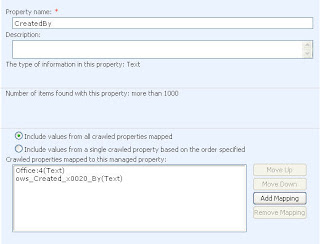
We need to modify the CreatedBy properties and add the mapping of office:4(text) and place it on the top mapping .


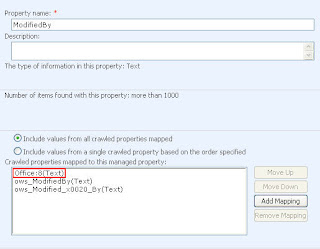
We need to modify the ModifiedBy properties and add the mapping of office:8(text) and place it on the top mapping


Next Complete a full crawl and BINGO !!

Tanks Yaniv Shasha

Saturday, April 18, 2009

Microsoft Best Practices Analyzer for Windows SharePoint Services 3.0 and the 2007 Microsoft Office System

The Microsoft Best Practices Analyzer for Microsoft Windows SharePoint Services 3.0 and the 2007 Microsoft Office System creates detailed reports to help administrators achieve greater
performance, scalability, and uptime
Yaniv Shasha

Friday, April 17, 2009

SharePoint 2007 SP2

It’s just announced: the SP2 is coming on April 28. The details and the full list of updates can be found here.

Tuesday, February 10, 2009

Moving Database To different SQL server

Two great article contains information and steps for moving all the databases associated with Microsoft Office SharePoint Server 2007 from one database server to a new database server that has a different name/same name


Friday, February 6, 2009

SharePoint Diagnostics (SPDiag) Tool v1.0 for SharePoint Products and Technologies

The real power of Office SharePoint Server 2007 and Windows SharePoint Services 3.0 is that they can be endlessly customized to meet a wide variety of business needs.
The Protean nature of SharePoint is at once its most powerful feature and its most formidable; the complexity of your SharePoint environment can increase by orders of magnitude when you begin to shape it to suit your needs.
This complexity can make troubleshooting SharePoint issues a daunting task, as many different data points from different sources must be correlated and analyzed.

The SharePoint Diagnostics (SPDiag) tool v1.0 greatly simplifies the process of gathering and analyzing troubleshooting data, and can significantly reduce the time needed to diagnose issues. SPDiag v1.0 provides administrators with a unified interface for troubleshooting SharePoint performance issues, and saves collected data and reports to a SQL Server database.
With SPDiag v1.0, you can:

Collect IIS and ULS log files, performance counter data, event logs, and WMI instrumentation data from a SharePoint farm.


Filter data to show granular information related to specific servers, Web applications, HTTP requests, event IDs, URI queries, and almost any other data points captured through supported channels.


Create custom reports that can help reveal performance trends over time.


Create snapshots of your SharePoint farm that include detailed information about your farm’s hardware, installed software and logical topology.


Export collected data and reports that can be sent to Microsoft support personnel.

SPDiag v1.0 is included in the Microsoft SharePoint Administration Toolkit v3.0, available for download at the following locations:


Microsoft SharePoint Administration Toolkit v3.0 x86: http://go.microsoft.com/fwlink/?LinkId=141504
Microsoft SharePoint Administration Toolkit v3.0 x64:
http://go.microsoft.com/fwlink/?LinkId=142035


Documentation for SPDiag is available from those download pages as well.

Yaniv Shasha

Friday, January 16, 2009

DPM SP1 -גיבוי שיחזור חוות SP

אתר מעולה ללימוד פונקציונאלית של DPM בהקשר של גיבוי שיחזור SP

https://www.microsoft.com/systemcenter/dataprotectionmanager/en/us/protect-sharepoint.aspx

המוצר יכול לשחזר את ה LEVELS הבאים :


o Farm recovery
o Site recovery
o Item recovery

לפי נתונים של מיקרוספט גיבוי של חווה עם 50 TB של תוכן כולל בניית קטלוג אורכת כשעתיים ורבע , המוצר משתמש בטכנולוגיה של VSS (volume shadow copy) – שמגבה block של מידע

לא מזמן שוחרר SP1 של המוצר, שמביא איתו חידושים משמעותיים :

· שיפור ניכר של יצירת הקטלוג לאחר הגיבוי – מיקרוסופט מוסרים נתונים של שיפור בניית של קטלוג מ 10 שעות לשיפור של 15 דקות בלבד !!!
· גיבוי האינדקס של SP -מה שמונע מאיתנו ביצוע full crawl לאחר שיחזור (בחוות גדולות זוהי פעולה שיכולה לקחת ימים שלמים !)

נראה ששינויים אלו יכולים לדחוף את המוצר לקו הקדמי של השחקנים המשמעותיים בשוק גיבוי / שיחזור SP

· חיסרון של המוצר (לאחר בדיקה עם מיקרוסופט) שהמוצר אינו תומך בחוות שהיא cross domain – כלומר ה SP וה SQL חייבים להיות באותו דומין בכדי שיהיה קשר בין ה Agent לבין קונסולה הניהול של DPM
כנראה שעוד שני דורות של המוצר זה יהיה ניתן לביצוע .


יניב שאשא

Thursday, January 15, 2009

Visual Studio 2008 Extensions for SharePoint v1.3

Microsoft releases finally the VS Extensions for SharePoint
The Extensions can help development to create various SharePoint artifacts such as Web Parts, Content Types, Event Receivers and a number of others
The biggest one in my opinion is x64 support, it mean that now you can develop on an x64 Os

The new features in VSeWSS 1.3 are

o Can be installed on x64 Server OS machines running SharePoint x64. Previously only x86 Server OS could be used

o Separate build commands for package, deploy and retract are added

o Command line build, package and retract commands are included enabling continuous integration and build servers. Previously command line build of SharePoint projects was very difficult

o Refactoring support for renaming of Web Parts. Previously renaming a web part required changes in several files in the project

o WSP View improvements for consistency of deleting feature elements, merging features and adding event receivers to features

o Solution Generator can now generate solutions from publishing sites. Previously only regular sites could be generated

o Allowing partial trust BIN deployments of web parts. CAS configuration must still be provided by the developer.

o New project item template for SharePoint RootFiles items

o Deployment will now optionally remove conflicting existing features on the development server prior to redeployment. Previously any feature name conflicts would result in an error

o Ancillary assemblies such as for business logic can now be added to the SharePoint Solution WSP

o Hidden features related to Site Definition projects are now shown in WSP View. They are no longer hidden

o For advanced users a fast deploy is included to update only the compiled assembly on the SharePoint development installation

o The User Guide is now installed with the extensions instead of being a separate download

Download from here
https://connect.microsoft.com/Downloads/DownloadDetails.aspx?SiteID=428&DownloadID=15946


Yaniv shasha

Friday, January 2, 2009

SharePoint Analyzer


SharePoint Analyzer v1.1

Same useful free tool from Bamboo

With this tool you can display the following information about your SharePoint farm:

· The information for the entire farm topology, from Web Application down to individual lists.
· Server information, including patches and updates.
· Database information that are being used as part of your SharePoint deployment.
· Solutions and Features that are deployed, which are displayed per Web App, Site Collection or Site scope.
· Services and their status.
· Information about Bamboo products that are used in your farm.
http://community.bamboosolutions.com/media/p/7160.aspx

Thursday, January 1, 2009

Semantic URL's in SharePoint Sites

The URL of Must the internet faced SharePoint site which I know, is look like:

http://blablabla/Pages/defult.aspx

The critical disadvantage in this URL structure is it's Not user friendly URL
And another reason, why semantic URL's are important, is the Search Engine Optimization (SEO).
Same tool that I find that can be were helpful for URL rewriting is

Imtech SharePoint Semantic URL's v1.0.0.0

That can be finding here
http://www.codeplex.com/tmt/Release/ProjectReleases.aspx?ReleaseId=14648


Imtech SharePoint Semantic URL's allows you to use semantic URL's in Microsoft Office SharePoint Server 2007 WCM solutions
For example:
http://myorganization.com/Division/Pages/Services.aspx
Becomes http://myorganization.com/Division/Services


More information about the Feature and screenshots available http://blog.mastykarz.nl/2008/06/23/semantic-urls-in-moss-2007-imtech-sharepoint-semantic-urls-free-feature/

Thanks yaniv shasha

Tuesday, December 30, 2008

Microsoft online services

Microsoft exposes new solutions that stand next to the Google apps, Called Microsoft online
With this solution user can open there internet explorer browser and connect to Microsoft exchange\ SharePoint\dynamic CRM\OCS, that host on Microsoft server.Its saves to the organization management time, server hardware cost, storage cost, and license cost, no need to purchase server license
The solution can connect to the organization active directory, so we can use the users and security rules
Link to the solution home page http://www.microsoft.com/online/default.mspx


Thanks from Yaniv

Tuesday, December 16, 2008

How to index SharePoint Portal Server 2003 list items in SharePoint Server 2007

הבעיה : כאשר מנוע החיפוש של MOSS מנסה לאנדקס אתר SPS2003 מרוחק,
מתגלה שה Crawler לא נכנס לתוך הרישימות בתוך ה SPS ולכן הפריטים (Items ) לא מאונדקסים.

הפיתרון : http://support.microsoft.com/kb/937884

תקציר ה KB מכוון לכך, שיש לערוך את ה Crawl Rule שאחראי לגבי ל SPS ושם לסמן את הערך :

Crawl complex URLs (URLs that contain a question mark (?))
לאחר קינפוג החוק, יש לבנות אפליקציה קטנטנה (הקוד נמצא במאמר), ובה יש להכניס את שני הערכים הבאים :
SSP URL
Crwal Rule URL

יש לבצע בסיום Full Crawl, וזה עובד כמו קסם !!

יניב

Monday, December 15, 2008

אנטי וירוסים לחווה


אם אנו משתמשים באנטי וירוס "רגיל" על שרת ה SharePoint (יש להתקין רק על שרתי ה WFE !! ) יש לבצע Excluded לאיזורים מסוימים , הנה מאמר המפרט את אותם איזורים
http://support.microsoft.com/kb/952167

מזכיר לכם שישנם אנטי וירוסים עם Agentים של SharePoint שלא מצריכים התאמות מיוחדות .

המוכר מכולם הוא ה Forefront של מיקרוסופט
http://www.microsoft.com/forefront/sharepoint/en/us/default.aspx
ישנו מוצר של מקאפי
http://www.mcafee.com/us/enterprise/products/anti_virus/collaborative_environment_protection/portalshield_microsoft_sharepoint.html

וגם סימנטק נכנסה לשוק
http://www.symantec.com/en/uk/business/protection-for-sharepoint-servers

תודה יניב

Tuesday, December 2, 2008

IIS error in Sharepoint Farm

נתקלתי בעבר בכמה חוות שברגע שנכנסים ל IIS , הוא נראה כך :

אם מבצעים IIS RESET הבעיה חולפת נקודתית אך חוזרת חלילה .

ב Event אנו רואים את הודעות הבאות 7076, 6398, 6482

מיקרוסופט שיחררה Hotfix לפתרון הבעיה בדמות KB 946517

http://support.microsoft.com/?id=946517

תודה יניב .

Monday, November 3, 2008

המלצות על ביצועים של SQL בחוות SHAREPOINT

שלום,
רוב התוכן של SharePoint נשמר בתוך ה SQL, כך שיש לו משקל קריטי בחווית השימוש במוצר .

הנה מספר המלצות לתפעול ותחזוקה יעילה יותר של SQL בהקשר של MOSS

. מומלץ לבצע חלוקה לשני SQL Instances:
o Instance 1 - בסיס הנתונים של החיפוש + בסיסי נתונים של הגדרות
o Instance 2 - בסיסי הנתונים של התכנים.

2. נפח הנתונים המרבי המומלץ עבור בסיס נתונים של תוכן הוא: GB100.
על מנת לאכוף את ההמלצה הנ"ל, יש להגדיר מדיניות מכסה (Quota) ברמת ה Site Collections (שלא לחרוג מנפח של 100GB), תוך התחשבות בדרישות

3. יש לבצע הפרדה בין קבצי ה SQL Transaction Logs לבין בסיס הנתונים של SQL לדיסקים פיזיים נפרדים.

4. מומלץ לפצל את ה TempDB לעד 8 קבצים (בהתאם לכמות ה Cores של שרת ה SQL – במידה והשרת מכיל 8 Cores או יותר: 8 קבצים, במידה והשרת מכיל פחות מ 8 Corse: בהתאם לכמות ה Cores)


5. מומלץ לשנות את ההגדרה של ה Auto Grow של בסיסי הנתונים של תוכן וכן של ה Transaction logs ל 10% (במקום גידול של 1MB)

6. בסיסי הנתונים של תוכן יוגדרו (ברירת המחדל) ב Full Recovery Model, על מנת לאפשר ביצוע גיבוי שוטף של ה Transaction Logs.


7. בעת בניית האתרים והתיקיות/ספריות מסמכים, יש להקפיד שלא לחרוג מכמות של 2,000 פריטים בתיקיה/תצוגה, על מנת שלא לפגוע בביצועי המערכת ובחוויית המשתמש.

יניב שאשא

Wednesday, October 29, 2008

Template Installation sharepoint

In this post I would like to talk about the fantastic 40
It's not a dream team or same group from fairy tale
Its 40 site template for WSS and MOSS, and with this template we can create a site that help to managed help desk division, or site for call center and many more
We can download the template from here
http://technet.microsoft.com/en-us/windowsserver/sharepoint/bb407286.aspx

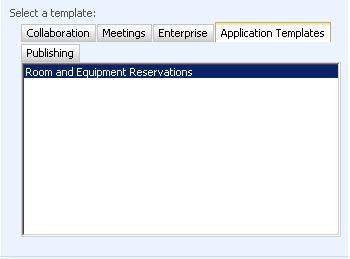
In our example we install the Room and Equipment Reservations template
This template will help as to manage Equipment, like meeting room (no more public folder!!) car, or lap top
Before we install the template, we must install the Application Template Core
This template is an administrative template, and it's the platform for all the other templates.
Link to download the Application Template Core
http://www.microsoft.com/downloads/details.aspx?familyid=C1039E13-94DA-4D7D-8CAE-3B96FA5A4045&displaylang=en
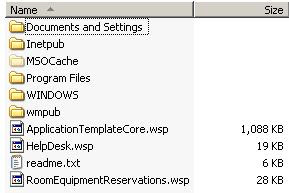
first step we need to Extract the files to c folder


the administration Service must to be active


Install Application Template Core- Add solution
stsadm -o addsolution -filename c:\ applicationtemplatecore.wsp


Deploy Solution
stsadm -o deploysolution -name applicationtemplatecore.wsp -allowgacdeployment –immediate


stsadm -o copyappbincontent


RoomEquipmentReservations.wsp
stsadm -o addsolution -filename c: \RoomEquipmentReservations.wsp


Allow files to the GAC

stsadm -o deploysolution -name RoomEquipmentReservations.wsp -allowgacdeployment –immediate


perform iisreset

Now when we create new site, we can see that a new category Application Templates


Thanks Yaniv s